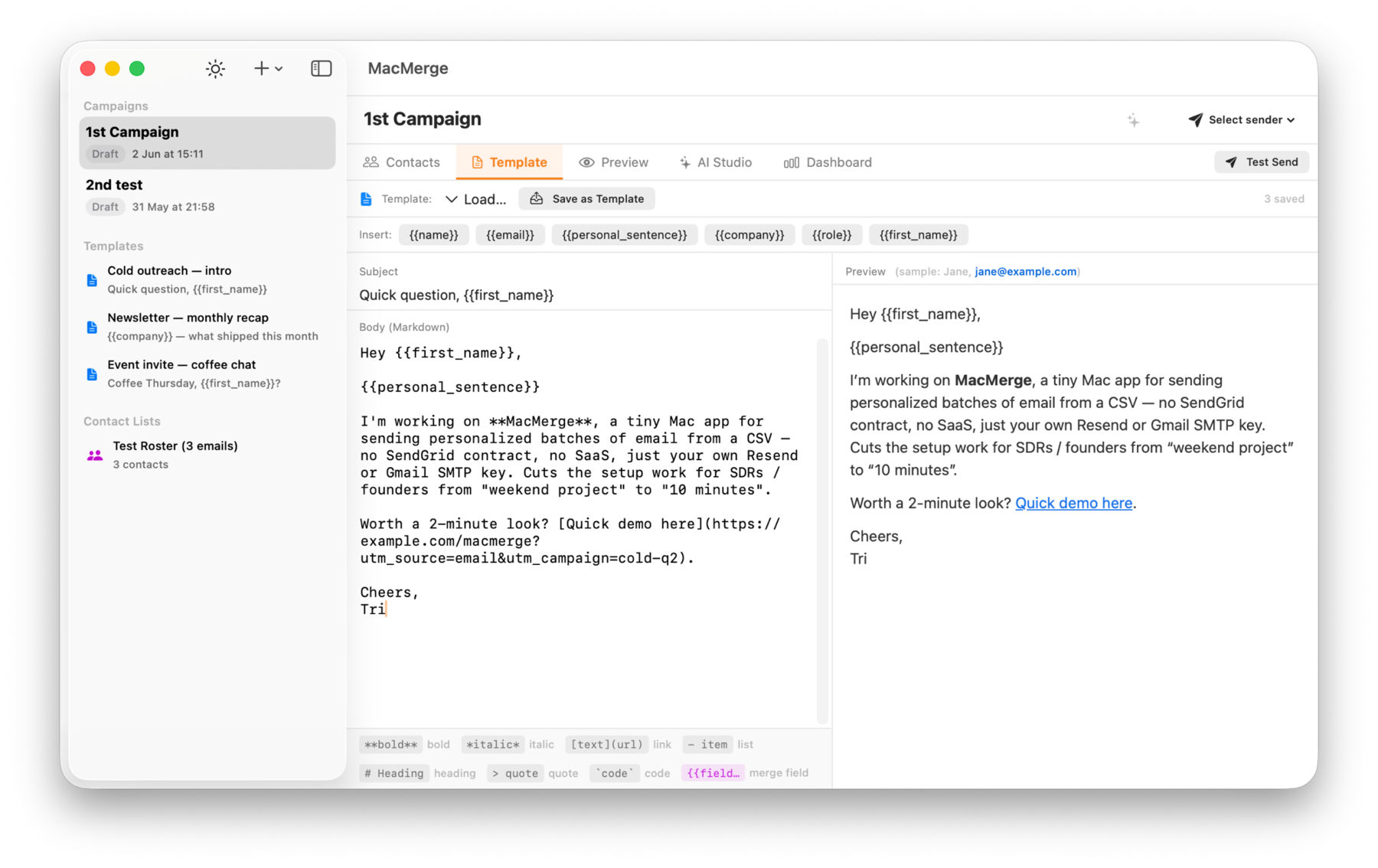
MacMerge sends 50 to 200 genuinely personalized emails from your Mac — on-device AI writes the opening line, Resend tracks every open and click. No web app. No monthly fee. No data leaving your machine.
Free · Version 0.3.0 · Requires macOS 26 Tahoe or later
One window. Import, write, personalize, send, track. MacMerge does the whole loop and stays out of your way.
Apple Intelligence writes a unique opening sentence for every contact from their name, role, and company. Specific, not generic — and it never leaves your Mac.
Apple IntelligenceWrite once in plain Markdown with {{merge_fields}}. Any CSV column becomes a field. Renders to clean, deliverable HTML that reads like a human wrote it.
Drag a CSV or paste from Google Sheets. Columns auto-detect and map to fields. Re-import is idempotent — your edits and sent status survive.
Resend delivers your batch with built-in open and click tracking. Rate-limited, retried, and crash-safe — every send is committed atomically.
Watch delivered, opened, clicked, and bounced counts in real time. Drill into any contact for the full event timeline. Know what's landing.
Keys live in the macOS Keychain. AI runs locally. No account, no server, no telemetry. The only packets that leave are the emails you choose to send.

Drag your CSV in. Map email, name, company — anything. 184 contacts, ready in seconds.
Compose one Markdown template with merge fields. A live preview renders as you type.
One click and on-device AI drafts a tailored opener per contact. Edit any line you want.
Review, then send. Watch opens and clicks roll in on the live dashboard.
No Electron, no web wrapper. Five dependencies, a single SQLite file per campaign, and a signed DMG that auto-updates itself.
Everything you need to know about MacMerge.
MacMerge is a native macOS app for personalized email outreach. It imports a contact list, merges it into a Markdown template with {{merge_fields}}, optionally writes a personalized opening line per contact using on-device AI, and sends the batch with open and click tracking. Built for SDRs and founders sending 50–200 emails per campaign — without Mailchimp or HubSpot overhead.
Drag a CSV in and map the columns to fields. Write one Markdown template using merge fields, then optionally click Generate Personalization to let on-device AI craft a unique opener per contact. Step through the preview, edit anything, and hit Send. Most users go from launch to first send in under five minutes.
No. MacMerge uses Apple Foundation Models running entirely on-device. Contact data never leaves your Mac for the AI step — no AI API keys, no per-token cost. The only network calls MacMerge makes are to your chosen sending provider when you actually send.
Two send paths. Resend is primary and gives built-in open and click tracking via a simple API key. Google Workspace SMTP is the secondary path for sending from your own branded account using an app password. Resend offers full tracking; the SMTP path reports sent and failed status only.
Yes, when you send through Resend. MacMerge polls the Resend API and shows a live dashboard with delivered, opened, clicked, and bounced counts plus a per-contact event timeline. The Google SMTP path has no tracking — it reports only sent and failed.
CSV and TSV files, plus pasting directly from Google Sheets. Columns auto-detect and map to fields, and any imported column becomes a usable merge field. Re-importing is idempotent: it matches contacts by email and preserves their personalization and sent status.
All credentials — your Resend API key and Google SMTP app password — are stored in the macOS Keychain, never in plain text or the campaign database. MacMerge is a signed, native app distributed as a DMG, and reaches the network only to send mail and poll tracking events.
MacMerge requires macOS 26 Tahoe or later. AI personalization needs a Mac with Apple Intelligence enabled. On Macs without it, every other feature works and the AI step shows a clear disabled state — you can still write and merge templates manually.
MacMerge is a lightweight, native, single-purpose tool — not a marketing platform. No monthly subscription, no web dashboard, no contact data on someone else's servers. It does one job: send a small batch of genuinely personalized one-to-one emails that read like a human wrote them. That's what gets replies.
MacMerge is a standalone Mac app with no recurring SaaS fee. You bring your own Resend or Google account for sending, and the on-device AI is free because it runs on your hardware. Updates arrive automatically through Sparkle from GitHub Releases.